Maximizer CRM - CRM Software Solutions - Contact Management Software - Customer Relationship Management | Maximizer Software
Blogs/Forum | Partner Login | Contact Us | 1-800-804-6299


Home > CRM > Workflow Automation

Workflow Automation: Process Automation and
Business Activity Monitoring with Maximizer CRM

Call Us 1-800-804-6299  
Email Sales »

Bookmark and Share

While the competition struggles with manual processes and reports on customer interactions, gain a competitive advantage by automating and monitoring critical business processes. Workflow Automation, powered by KnowledgeSync, streamlines processes and reduces manual work for frontline staff.

Workflow Automation is an engine that runs in the background through Maximizer CRM, providing business activity monitoring to ensure that critical tasks are completed based on other actions in the database, such as assigning web leads or notifying staff of service escalations. With Workflow Automation, relationship-building care and communication is streamlined and business processes are automated, minimizing the resources required to maximize revenue and customer satisfaction.

Business Activity Monitoring

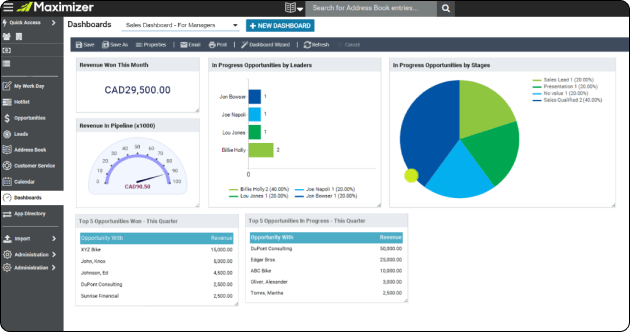
Maximizer CRM Business Activity MonitoringMonitor your sales, marketing, and service processes and daily operations to get greater visibility, manage by exception, and ensure staff are adhering to performance criteria. Business Activity Monitoring (BAM), using Workflow Automationi powered by KnowledgeSync, enables you to be notified immediately and respond quickly to critical customer i issues.

Benefits of Business Activity Monitoring (BAM)

  • Monitor critical business activity processes through graphical alert dashboards
  • Receive action-oriented alerts via email, phone, fax, or pager so you can respond to time-sensitive developments when they occur
  • Utilize over 90 pre-configured queries and 50 events (actions) to help you get started
  • Event Manager Navigator provides a visual workflow interface that provides simplified set-up of events and alerts
  • Configure your own unique business activity monitoring template to monitor the critical operations in your business
  • Pre-built events and queries for Maximizer CRM include business activity monitoring for:
    • Lead not assigned
    • Lead with no status update after X days
    • More than X lost or abandoned by any rep within Y days
    • Sales opportunity open for more than X days
    • Account Manager with fewer or more than X quotes in the last Y days
    • X open cases per assigned staff person
    • Customer service case open for more than one week
i Workflow Automation powered by KnowledgeSync is an add-on product with additional license fees.

Business Process Automation BPA

Automate CRM and administrative processes to save manual effort and time - so your staff can focus their time and resources on value-add activities, such as working with customers. Workflow and business process automationi powered by KnowledgeSync, enables you to monitor your system for activities, then trigger next actions - whether it be emailing the customer, notifying an account manager, send a reporting to an executive, or shipping out a product.

Maximizer CRM Process Automation

Business process automation can be used to automate virtually any standard or unique process you use with Maximizer CRM or other system. Simply define the parameters for the process you want to monitor in your systems, then define the actions you want it to take. Process automation actions can trigger another activity in Maximizer CRM or another system, or a simple notification. In this example, lead processing is automated to ensure that no step is missed.

Benefits of Business Process Automation:

  1. Web form data is entered into Maximizer CRM and stamped with the day’s date
  2. Checks territory, assigns lead to sales rep with a task alert
  3. Triggered into a one-on-one follow-up email campaign to receive personalized messages specific to the product they’d shown interest in
  4. If the sales rep has not followed up in a timely manner, an email alert is sent back to them and the sales manager to ensure immediate follow-up. Workflow Automation saves time, prompts faster response, and enables personalized follow-up—all adding up to competitive advantage
i Workflow Automation powered by KnowledgeSync is an add-on product
with additional license fees.

Email Monitoring

Email monitoring and email automation are critical element in providing a seamless customer experience is ensuring that all interactions with a customer are centralized. So when a customer emails an inquiry, then calls the next day - the response is consistent, no matter which department the representatives are in.

Workflow Automationi powered by KnowledgeSync enables you to monitor incoming emails, then automatically take the next action - such as replying to the customer and routing to the assigned staff member to ensure no inquiry goes unanswered.

Benefits of email monitoring and email automation:

  • Monitor incoming emails to company email addresses such as sales and customer service, create a task or service case in Maximizer CRM, and assign it to the appropriate staff person

  • Send an automatic response to email inquiries based on assigned service case or other details to establish the right customer expectations

  • Comply with anti-spam legislation with automatic opt-out linked to Maximizer CRM
i Workflow Automation powered by KnowledgeSync is an add-on product
with additional license fees.

Four


Phone 1-800-804-6299 or e-mail for more information or to request a demonstration.